TABLE OF CONTENTS
- Settings for Events that Require Qualifying
- Qualifying Scenarios
- Event Setup for Scenario 1
- Special Procedures for Running Qualifying Events
Settings for Events that Require Qualifying
Single elimination events can be set up as qualifiers for a Main Draw, Consolation or both. If it is a single elimination event, the Main Draw can be set up as a qualifier for a Bonus event for losers from the early rounds of the Main Draw. Main Draw, Consolation and Bonus events that are not qualifiers can be round robin, single or double elimination. These related events have special setup options. The following sections of this manual will explain how to set them up. Preparing and running those events will be covered.
Qualifying Scenarios
There are two main qualifying scenarios that will determine how to set up your events.
- Scenario 1: (The Standard PPA and APP Pro Format) The Tournament Director has decided on a core of players or teams that will play in the Main Draw. There are additional spots in that event that will be filled by players from a qualifying event.
- For Example: The Main Draw has 24 Pro Teams who have guaranteed spots in the event. There are eight more spots available. All teams will register for the Main Draw. When registration closes, the tournament director will leave the guaranteed teams in the event and move all remaining teams to the Qualifying Event. The Qualifying Event is played until there are eight teams remaining. They advance to the Main Draw that already has 24 teams. Optionally, the remaining teams may be moved to a Consolation event.
- Scenario 2: All teams must qualify for the Main Draw by playing in the qualifying event.This Scenario is Not Yet Implemented
- For Example: The Main Draw has 32 slots. The Qualifying Event has 64 slots. All teams register for the Qualifying Event. That event is played until there are 32 teams remaining. Those teams advance to the Main Draw. Optionally, the remaining teams may be moved to a Consolation event.
Event Setup for Scenario 1
The Main Draw is the event that players register for. A designated number of players will be moved from this event to the qualifying event after registration closes.
Set up the Main Draw event as follows:
- Set it up the way you want them to play out, Round Robin, Single or Double Elimination, can loser bracket play back to winners bracket and so on.
- If the Main Draw will be a qualifying event for a Bonus event, it must be set up as Single Elimination.
- Link to Parent Event – None
- Include in Registration Cost – Yes or No, up to the Tournament Director
- Event Cost – Set this to whatever you want to charge for this event.
- Lock Public Registrations – NO
The Qualifier is the event that some players from the Main Draw will be moved to after registration closes. A designated number of players from this event will qualify for the Main Draw. Optionally, a designated number of non-qualifying players may also move to another event (Consolation or Points Draw).
Set up the Qualifier event as follows:
- Set it up as a Single Elimination
- Link to Parent Event – Main Draw
- Include in Registration Cost – NO
- Event Cost – $0
- Lock Public Registrations – YES
Set up the Consolation event as follows:
- Set it up the way you want them to play out, Round Robin, Single or Double Elimination, can loser bracket play back to winners bracket and so on.
- Link to Parent Event – Main Draw
- Include in Registration Cost – No
- Event Cost – $0
- Lock Public Registrations – YES
After the Main Draw and Consolation events are set up, Edit the Qualifier event.
- Set Is Qualifier to Yes
- From the Winner to drop down menu, select the event the winners go to (usually the Main Draw) and the criteria for teams that will move.
- From the Loser to drop down menu, select the event the losers go to (usually the Consolation) and the criteria for teams that will move.
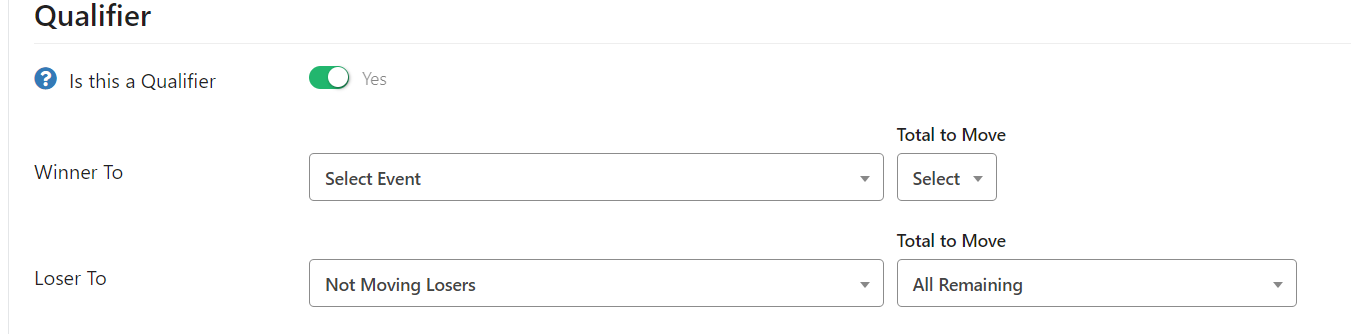
If there is a Bonus Draw event for a specified number of losers from the Main Draw, set it up as follows:
- Set it up the way you want them to play out, Round Robin, Single or Double Elimination, can loser bracket play back to winners bracket and so on.
- Link to Parent Event – Main Draw
- Include in Registration Cost – No
- Event Cost – $0
- Lock Public Registrations – YES
- Set Is Qualifier to Yes
- From the Loser to drop down menu, select the event the losers go (usually the bonus draw) and the criteria for teams that will move.
Special Procedures for Running Qualifying Events
When you complete a qualifying event, teams may be moved to another event based on the event settings for that event.
The process is the same for both Qualifying Scenario One and Qualifying Scenario Two.
- When the qualifier is over, click the big red button and the Main Draw and Consolation Events (Points Draw) will be populated. These will be in the Waiting Queue on the Live Console.
- Start and run these events.
- When you finish the matches in the Main Draw that are needed for the Bonus draw (if you have set one up) the system will automatically populate the Bonus Draw and it will be in the waiting queue.
- The system will automatically enter the correct number of team to the Points or Bonus Draw brackets. You do not have to go back and change the default or planned number of teams for these brackets.
Deleting Teams and Swapping Players from events using Qualifier setup
- If you’ve already created the brackets, or the Consolation (Points), Main, or Bonus draws were already populated and you wanted to remove a team you can do so by going to the live console, clicking One Step Verify, select the bracket from the select box, click the trashcan next to the team. This WILL auto re-verify the bracket.
- If you need to swap a player you can do so anytime. Before, during, or after the bracket has started.
Was this article helpful?
That’s Great!
Thank you for your feedback
Sorry! We couldn't be helpful
Thank you for your feedback
Feedback sent
We appreciate your effort and will try to fix the article